kali ini saya akan posting bagaimana cara instal net frame work 3.5.1 di windows 8 melalu Command Prompt .
Langsung saja kita liat cara-cara nya sebagai berikut :
1. Sediakan Installer Windows 8 ( bisa melalu DVD atau Mount klo anda punya ISO)
2. Kemudian anda buka CMD.exe dan klik kanan Run as Administator
3. Di CMd ketik dism.exe /online /enable-feature /featurename:NetFX3 /Source:G:\sources\sxs /LimitAccess
4. Enter dan tunggu hingga 100 % succesfully
Keterangan : Tanga G warna merah tersebut adalah dimana DVD atau ISO anda berada..
berikut Adalah Tutorial nya
1. Buka CMD dengan Run As Admin
2. Ketik dism.exe /online /enable-feature /featurename:NetFX3 /Source:G:\sources\sxs /LimitAccess

3. tekan Enter dan tunggu hingga 100 %

4. Finish
Semoga Bermanfaat
Terima kasih atas kungjungan nya...

 Protect Folder : Software untuk mengunci folder penting anda >> Free download Protect Folder : Software untuk mengunci folder penting anda - Buat menjaga privasi data kita, kadang-kadang kita mengincar Software untuk
membantu data yang kita simpan dalam satu buah folder. dengan adanya
proteksi tersebut tidak semua orang-orang bisa membuka data dan
mengakses folder anda.
Protect Folder : Software untuk mengunci folder penting anda >> Free download Protect Folder : Software untuk mengunci folder penting anda - Buat menjaga privasi data kita, kadang-kadang kita mengincar Software untuk
membantu data yang kita simpan dalam satu buah folder. dengan adanya
proteksi tersebut tidak semua orang-orang bisa membuka data dan
mengakses folder anda.Satu diantara Software yang terbukti bisa melaksanakan hal tersebut ialah Protect Folder : Software untuk mengunci folder penting anda . anda tinggal buat Folder yang siap diproteksi, masukkan data-data yang anda perlukan pada folder tersebut, oleh karena itu jika ada orang-orang yang mengakses folder tersebut akan muncul permintaan password yang telah anda buat sebelumnya.
download Protect Folder : Software untuk mengunci folder penting anda di sini :
sharebeast | Protect Folder download ( 3.6 MB )
Terima kasih atas kungjungan nya...

Avast! Free AntiVirus Home Edition 7.0.1466 - Merupakan versi gratis dari Antivirus Avast. Walaupun merupakan versi gratis, perlindungan yang di berikan avast free antivirus tergolong sangat baik. Antivirus ini akan memberikan perlindungan non stop kepada pc anda dari segala macam ancaman virus dan juga spyware. Selain itu dengan menggunakan Avast! Free AntiVirus Home Edition 7.0.1466, anda akan terbebas dari gangguan pusing, stres dan galau yang sering mengganggu penggunan Antivirus premium hehe.
Screenshot

- Integrated Virus Cleaner
- Network Shield
- Support for 64-bit Windows
- Web Shield
- Internationalization
Link download
Terima kasih atas kungjungan nya...

UltraISO Premium Edition 9.5.3 Build 2900 Full Version - Merupakan salah satu software yang handal mengurusi file Image ISO. UltraISO Premium Edition selain di gunakan untuk keperluan burning file ISO, juga dapat anda manfaatkan untuk mengedit, mengekstrak, menambahkan dan menghapus file / folder, membuat direktori baru dan merename file / folder yang berada di dalam Image ISO. Software ini juga memungkinkan anda untuk membuat file Image ISO langsung dari CD / DVD-ROM atau Hard disk pc anda.
Screenshot
 Features
- Can directly edit the ISO image file.
- Can directly extract files and folders from ISO image file
- Can add / delete /create new directory /rename ISO file image content.
- Can make ISO file from hard disk document.
- Can create CD/DVD image from CD/DVD-ROM, maintain bootable information.
- Can process the compact disc boot information, you can directly add/remove/extract boot image of the ISO image.
- Supports nearly all known CD/DVD image file formats (.ISO, .BIN, .IMG, .CIF, .NRG, .MDS, .CCD, .BWI, .ISZ, .DMG, .DAA, .UIF, .HFS and so on) , and can convert them to the industry standard nd widely supported ISO image format.
- May directly set the file/folder to hidden attribute
- upports ISO 9660 Level1/2/3 and Joliet extension
- Automatically optimizes the ISO image file structure, saves the disc space.
- Supports the shell document type integration, Open Image files through double clicking them or the Right Click menu of the mouse with the open dialog.
- The double window user interface is extremely convenient to use.
- There are rich add-on tools, you can create ALL in 1 bootable compact discs, CD/DVD image file management, even the virtual CD/DVD drive , those functions are really powerful.
Link download
- Sharebeast | UltraISO Premium Edition 9.5.3 Build 2900 - (4MB)
- serial key
name   : PremiuM-KoS
serial : 8154-0800-A39D-951E
Install
1. Ekstrak
2. Install Ultra ISO kemudian jalankan programnya
3. Pilih "Enter Registration Code"
4. Gunakan Serial Key Untuk registrasi
5. Enjoy
Terima kasih atas kungjungan nya...
Untuk tutorial ini Anda perlu foto yang lumayan bagus agar keliatan ferfect juga ... dan sebaiknya gelap (efek ini bekerja jauh lebih baik dalam pengaturan gelap)
Hasil Editing
Buka foto yang mau anda edit, kemudian pergi ke tab jalur dan klik membuat jalan baru.
Tekan "P" pada keyboard untuk memilih alat pena, Dapatkan ide dasar dari mana api akan. Perlu dimensi pikiran dan tindakan. Swirls melakukan keajaiban!
A. Click to start your path
B. Click your next point, hold and drag to create a bezier spline path, which is necessary to create flowing lines
C. Continue doing this, following the idea of where you want the fire to go.
Dont worry about getting it right the first time as you can change the
spline at any time…another little tip – if you press and hold ctrl while
using the pen tool you can temporarily access the direct selection tool
which will allow you to edit the spline (a big time saver)


04
And eventually…you get something like what i have below. Remember that your only going to use the parts of your path that are in front of the object your path follows…in this case the models arm, and leg. So don’t waste time trying to make the hidden parts look pretty.
05
A. Now you want to select a soft round brush (i used a 5 pixel brush here) and pick an orange color.B. Make a new layer and name it Fire.
C. Go back to the paths tab and select stroke path with brush.

06
You should immediately see the stroked path.On mine you’ll see splatters and flairs that weren’t part of the original path. Those give the fire line the illusion that it is moving, and were accomplished by simply grabbing the clone stamp tool – using a spatter brush and cloning/stamping areas of the path at random.
07
Mask/erase the parts of the path that are behind the legs/arms or whatever it is your paths follows.08
Right click on the Fire layer and select blending options, and use these options/values.Feel free to play with the settings (that’s how i discovered this technique)
You might end up with something better!

09
Duplicate the Fire layer, and set the layer mode to OVERLAYClick the eye next to inner shadow and inner glow on the duplicate layer to deactivate them.

10
Now double click on outer glow on the duplicate and change the values to this.
Conclusion
Spend a little time, and you can make something like what i have below…
For a different effect, duplicate the FIRE layer again, and filter>distort>wave.
Play with the opacity levels, and play with the blending modes – particularly OVERLAY.
Good luck!
MAAF..BAHASA NYA BAHASA INGGRIS,DIKARENAKAN HARI SUDAH LARUTT MALAMMJADI MALAS SUDAH NGANTUK..
Terima kasih atas kungjungan nya...
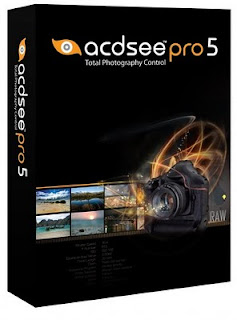
CDSee Pro 5 adalah aplikasi profesional dan dapat diandalkan, Software ini dirancang untuk merampingkan alur kerja dan untuk meningkatkan produktivitas Anda. Memberdayakan Anda untuk melihat, memproses, mengedit, mengatur, katalog, menerbitkan, dan meng-arsipkan koleksi foto Anda dengan presisi dan kontrol yang diminta oleh fotografer profesional di seluruh dunia.
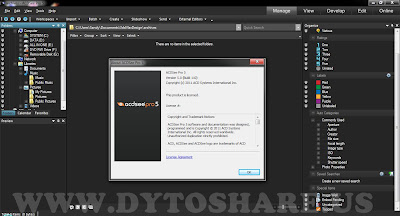
What's New in ACDSee Pro 5
Feel the difference in your photography
ACDSee Pro 5 delivers more features photographers want, giving you even more control over your photography workflow.Photo Developing

Smarter Sharpening
A new user-controlled edge detection mask slider lets you focus the sharpening effect more to edges and textures than non-textured areas.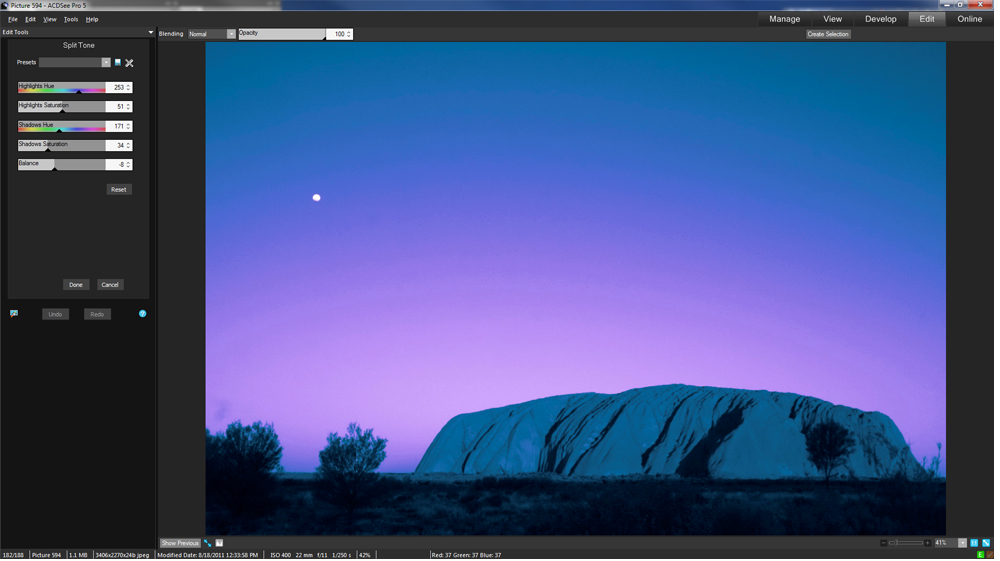
Split-toning
Take your photos to the edge in either Develop or Edit mode using split-toning to create sepia or tinted black & white, Or add a tinted color to highlights and another to shadows to create a dramatic toning effect.Photo Editing

Dodge and Burn
Target shadows, midtones or highlights for lightening or darkening with the Dodge and Burn tool, or selectively add vibrance, saturate or desaturate areas of interest.
Drawing Tools
Put your photos to work for you using drawing tools to add lines and shapes such as squares, circles and arrows to draw attention to certain elements in your image. You can also adjust the width, feathering and blending of your brush to create subtle or dramatic drawing effects.Special Effects
Apply and fine-tune a range of pre-set effects quickly and easily with the Special Effects palette, now including:
Lomo Effect
Apply the popular Lomo effect to give an edgy, retro feel to your photos.Collage Effect
Creatively display your photo in a collage of prints.Orton Effect
Give an ethereal, pastel-like touch to your portraits and landscapes.Workflow
Color Labels
Use color labels to quickly identify groups within a large number of photos for processing. As your review your photos, quickly mark ones for different stages of your workflow. For example, assign files to color labels you have named such as upload, print, reject, develop or edit and then click a color label in the Organize pane to quickly display all of the files assigned to that label. Or use them in combination with the Group by, or Filter By features to refine your list. Color labels, like tagging, categories and ratings, are a way to set aside, organize, and group your photos without moving them into different folders.
Batch Export Tool
Save a group of photos to your specifications faster than ever with the updated ACDSee Pro 5 Batch Export tool. The batch export tool allows you to create presets for easily exporting groups of files to specified folders, file names, formats, colour spaces and dimensions.
Remove Metadata
Use the Remove Metadata tool to keep your proprietary information private by stripping EXIF and IPTC metadata to protect the details of your locations, camera settings and equipment choices.Link Download
Sharebeast | ACDSee pro 5.0 - Full Version (68.79MB)
Sharebeast | Crack_ACDSee Pro 5.0 (6.0 MB)
Terima kasih atas kungjungan nya...
About This Blog